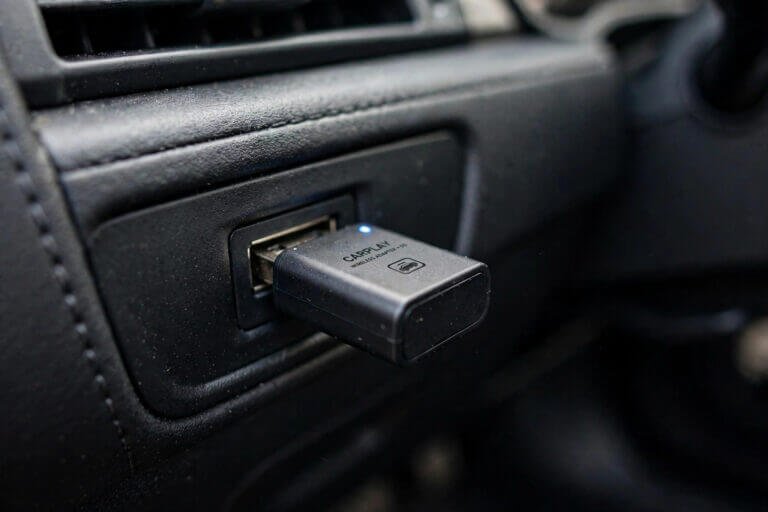
Every drive starts the same way: find the cable, plug it in, untangle it from the seatbelt, and hope the port is not full of dust. Wireless CarPlay ends that ritual. You get in the car, the phone connects by itself, and maps, music, and calls appear on the screen without a wire. The best wireless CarPlay adapters for older cars do this for cars that already have wired CarPlay — a small plug-in box that turns your factory wired system into wireless, with no installation and no new head unit.
There is one rule that decides everything, and it is the first thing to understand: these adapters only work in cars that already have wired CarPlay. They do not add CarPlay to a car that never had it. If your car has a USB port that shows CarPlay on the screen when you plug your iPhone in, an adapter will work. If it does not, no adapter will help, and you need a new head unit instead. This guide compares five adapters for cars that pass that test.
Best Wireless CarPlay Adapters for Older Cars at a Glance
| Adapter | Systems | Boot time | Best for |
|---|---|---|---|
| CarlinKit 5.0 2air | CarPlay + Android Auto | Fast | Most drivers |
| CarlinKit 4.0 CP2A | CarPlay + Android Auto | 12–15 s | Budget buyers |
| Ottocast Mini Cube 3.0 | CarPlay + Android Auto | About 5 s reconnect | Smallest adapter |
| Teeran 2-in-1 CP13 | CarPlay + Android Auto | Under 3 s reconnect | Most car models |
| AAWireless TWO+ | CarPlay + Android Auto | Fast | Android Auto households |
Here are the best wireless CarPlay adapters for older cars we compared, with the strengths and limits of each one spelled out so you can match the adapter to your car and your phone.
1. CarlinKit 5.0 2air — Best Overall
Best for: most drivers — the newest CarlinKit, with the fastest connection and the best update support.
The CarlinKit 5.0 2air, model CPC200-2air, is the newest adapter in CarlinKit’s line, and it is the best all-round choice in this guide. It uses dual-band Wi-Fi to connect your phone to the car’s system, supports over-the-air firmware updates so it improves over time, and includes both a USB-A-to-C and a USB-C-to-C lead, so it fits the USB port in almost any car. It works with iPhone 6 and later running iOS 10 or newer, and with Android 11 and later for Android Auto. It is listed at $49.99, which makes it one of the cheapest adapters in this guide as well as the newest.
The practical advantage is reliability. Dual-band Wi-Fi means the adapter can use the 5 GHz band, which is less crowded than 2.4 GHz and gives a more stable connection with less lag. The OTA updates matter too: CarPlay adapters are software products, and the ones that get updates keep working when Apple changes iOS. One exclusion to note: CarlinKit states that the 5.0 2air does not work with BMW, so BMW owners should look elsewhere.
- Pros: newest CarlinKit model; dual-band Wi-Fi for a stable connection; over-the-air updates; both USB cable types included; listed at $49.99.
- Cons: does not work with BMW; requires wired CarPlay already in the car; a few seconds of boot time on every start.

- Wireless Freedom: Effortlessly upgrade factory Wired CarPlay/Android Auto to wireless. Stream music, podcasts, and navig…
- Compatibility Note: Only works within the same system (no cross-conversion). Not compatible with BMW/Tesla. No video str…
- Reliable & Future-Proof: -20°C to 60°C (-4°F to 140°F) operating range. Our Carlinkit 5.0 wireless CarPlay adapter suppo…
2. CarlinKit 4.0 CP2A — Best Budget Pick
Best for: budget buyers who want a proven adapter that also handles Android Auto.
The CarlinKit 4.0, model CP2A, is the long-running workhorse of the CarPlay adapter world. It converts wired CarPlay to wireless CarPlay, and it also converts wired CarPlay to wireless Android Auto — which means a household with one iPhone and one Android phone can both use it, depending on which phone is in the car. It is listed at $55–65, and its boot time is 12–15 seconds, which is slower than the newer models but acceptable once you are used to it.
The 4.0 is the adapter to buy if you want the most proven option at the lowest price. It works with 98% of factory CarPlay cars, according to CarlinKit, but it does not work with BMW or Tesla. The slower boot time is the main trade-off: you will wait a few seconds longer for CarPlay to appear than with the 5.0 2air. If you can live with that, the 4.0 gives you the same wireless experience for similar money.
- Pros: converts to wireless CarPlay or wireless Android Auto; works with 98% of factory CarPlay cars; proven long-running model; listed at $55–65.
- Cons: slower boot time at 12–15 seconds; does not work with BMW or Tesla; older hardware than the 5.0 2air.

- High Sensitivity 5G Smart Chip: Built-in 5G smart chip with fast processing speed and reduced delayed response using 2.4…
- Wireless CarPlay and Android Auto Functionality: Enjoy automatic wireless connection to CarPlay and Android Auto without…
- Device Compatibility Requirements: Compatible with cars that have factory-installed wired CarPlay systems. Not compatibl…
3. Ottocast Mini Cube 3.0 — Best Tiny Adapter
Best for: drivers who want the smallest adapter that disappears into the USB port.
The Ottocast Mini Cube 3.0 is a cube measuring 21.6 by 21.6 by 23.5 millimetres and weighing about 8.8 grams — small enough that it is barely visible once plugged in. It reconnects in about 5 seconds, supports firmware updates over the air, and is listed at $43.99, which makes it the cheapest adapter in this guide. More than 2,000 units were bought in the past month on its Amazon listing, which is a useful sign of how many people are choosing it.
The small size is the whole point. A large adapter dangling from a USB port gets knocked, pulled, and eventually damaged; a tiny cube sits flush and stays put. The aluminium body helps it survive heat and knocks. The trade-off is that a tiny adapter has no screen and no buttons, so all configuration happens through the phone — which is fine, because you will configure it once and never touch it again.
- Pros: tiny 21.6 mm cube at about 8.8 g; reconnects in about 5 seconds; over-the-air updates; listed at $43.99.
- Cons: no screen or buttons — all setup is through the phone; small size makes it easy to lose if unplugged; requires wired CarPlay already in the car.

- 【So Tiny, You’ll Double-Take】“Wait, that’s it?” Yep, this Ottocast Mini Cube 3.0 adapter is literally the size of your t…
- 【Plug It In, Forget About It】“Do I need a manual the size of a phone book?” Nah. First-time setup takes seconds. After t…
- 【Two Phones? No Problem】“Can it handle my work and personal phone?” Sure thing. This 2-in-1 wireless CarPlay Android Aut…
4. Teeran 2-in-1 CP13 — Best for Most Cars
Best for: drivers who want the widest car compatibility and the fastest reconnect.
The Teeran 2-in-1, model CP13, is a dual-system adapter that handles both wireless CarPlay and wireless Android Auto, and it claims compatibility with more than 1,000 car models from 2015 onwards — specifically, 98% of cars with wired CarPlay. It uses dual-band 2.4 and 5 GHz Wi-Fi, and it auto-reconnects in under 3 seconds, which is the fastest reconnect in this guide. It is listed at around $75, and more than 2,000 units were bought in the past month on its Amazon listing.
The fast reconnect is the feature you will notice every day. A 3-second reconnect means CarPlay is ready by the time you have put your seatbelt on; a 15-second reconnect means you are waiting at the end of the driveway. The dual-band Wi-Fi gives a stable connection, and the wide compatibility means it is the safest pick if you are unsure whether your car is supported. Check the listing for your exact car model before buying, as with any adapter.
- Pros: works with 1,000+ car models; auto-reconnect in under 3 seconds; dual-band Wi-Fi; handles both CarPlay and Android Auto.
- Cons: higher price at around $75; requires wired CarPlay already in the car; check the listing for your exact model.

- Upgrade to Wireless CarPlay & Android Auto The 2 in 1 Wireless CarPlay and Android Auto Adapter converts your factory wi…
- Fast Easy Setup & Auto Reconnection No app or complicated setup required. Just pair once via Bluetooth and enjoy automat…
- OEM-Level Wireless Performance & Vehicle Control Our car adapter maintains the full functionality and preserves the seam…
5. AAWireless TWO+ — Best for Android Auto Too
Best for: households with both iPhones and Android phones, and drivers who want the strongest wireless signal.
The AAWireless TWO+ is the newest adapter from AAWireless, a brand that built its name on Android Auto adapters, and it is the best choice in this guide for a household that uses both systems. It handles wireless CarPlay and wireless Android Auto, it has a multifunction button for quick actions, and it was rated as having the strongest Wi-Fi signal in CarPlay Life’s 2026 adapter testing. It works with iPhone X and later, and with Android 11 and later.
The strong Wi-Fi signal matters in a real car, where the phone is in a pocket or a bag and the adapter is buried in the center console. A weak signal means dropouts and lag; a strong signal means a stable connection. The multifunction button is a small but useful addition — it lets you switch phones or restart the connection without unplugging anything. If your household has one iPhone and one Android phone, this is the adapter to buy.
- Pros: handles both CarPlay and Android Auto; strongest Wi-Fi signal in 2026 testing; multifunction button; good for mixed-phone households.
- Cons: requires wired CarPlay already in the car; newer model with a shorter track record than CarlinKit; check the listing for your exact car model.

- Compatible with wired-only Android Auto & Apple CarPlay systems. Requires Android 11+ or iPhone X and newer.
- Multifunctional button for easy phone pairing and switching
- Connects unlimited phones — perfect for road trips
How to Choose the Best Wireless CarPlay Adapters for Older Cars
Choosing among the best wireless CarPlay adapters for older cars starts with one question — does your car have wired CarPlay? — and then moves to boot time, latency, and updates. Get the compatibility right first, because everything else is irrelevant if the adapter cannot talk to your car.
Compatibility: the one rule
These adapters only work in cars that already have wired CarPlay. They plug into the car’s USB port and pretend to be a wired iPhone, then relay the connection wirelessly to your real phone. If your car has no CarPlay at all, there is nothing for the adapter to pretend to be, and it will not work. To check: plug your iPhone into the car’s USB port with a cable. If CarPlay appears on the screen, you have wired CarPlay and an adapter will work. If nothing appears, check your car’s manual or the manufacturer’s website — some cars have CarPlay only on certain USB ports, usually the one labelled with a phone or CarPlay icon. For a deeper compatibility guide, see the CarStechie guide to wireless CarPlay adapters compatible with factory systems.
Boot time and latency: why wireless feels slower
Wireless CarPlay is always a few seconds slower to start than wired, because the adapter has to boot, connect to your phone over Wi-Fi, and then hand the connection to the car. Boot times in this guide range from about 5 seconds for the Ottocast Mini Cube 3.0 to 12–15 seconds for the CarlinKit 4.0. Latency — the delay between touching the screen and seeing a response — is around 80 milliseconds on a good adapter, which is barely noticeable for maps and music but can feel sluggish if you are used to a wired connection. Dual-band 5 GHz Wi-Fi reduces latency compared with 2.4 GHz, which is why the newer adapters in this guide use it.
Wi-Fi band and updates
Dual-band Wi-Fi (2.4 GHz plus 5 GHz) gives a more stable connection than 2.4 GHz alone, because the 5 GHz band is less crowded. Over-the-air updates matter more than they sound: Apple changes iOS every year, and an adapter that cannot be updated may stop working after an iOS update. The CarlinKit 5.0 2air, the Ottocast Mini Cube 3.0, and the AAWireless TWO+ — three of the best wireless CarPlay adapters for older cars — all support OTA updates, which is one reason they are the top picks in this guide.
Android Auto: the dual-system question
If your household has both iPhones and Android phones, buy a dual-system adapter — the best wireless CarPlay adapters for older cars handle both systems. The CarlinKit 4.0, the Teeran CP13, and the AAWireless TWO+ all handle both wireless CarPlay and wireless Android Auto, so whichever phone is in the car will connect. Note that the Motorola MA1 is Android Auto only — it does not do CarPlay at all — so do not buy it for an iPhone. For a comparison of the two ecosystems, see the AAWireless comparison of AAWireless vs Motorola and the Motorola MA1 page at motorolasound.com.
How to Set Up a Wireless CarPlay Adapter
Setup takes about five minutes and you only do it once. Plug the adapter into the car’s CarPlay USB port — the one that shows CarPlay when you connect a cable. Wait for the adapter to boot, which takes 5–15 seconds depending on the model. On your iPhone, go to Settings, then General, then CarPlay, and select the adapter when it appears. The phone and the adapter pair over Bluetooth first, then switch to Wi-Fi for the actual CarPlay connection. After that first pairing, the phone connects automatically every time you start the car, usually within a few seconds of the engine starting.
If the connection fails, the fix is usually simple: unplug the adapter, wait 10 seconds, plug it back in, and try again. If it still fails, check that your phone’s Bluetooth and Wi-Fi are both on, that the car is not already connected to another phone, and that the adapter’s firmware is up to date. Most adapters have a companion app or a web page for firmware updates — check the manufacturer’s instructions for your model. Once it works, leave the adapter plugged in permanently; there is no reason to remove it.
Common Mistakes to Avoid
- Buying for a car without wired CarPlay. The most common mistake when shopping for the best wireless CarPlay adapters for older cars is assuming any car can be upgraded. If your car has no wired CarPlay, no adapter will help — you need a new head unit.
- Using the wrong USB port. Many cars have several USB ports, but only one supports CarPlay. Use the port that shows CarPlay when you plug in a cable, not the charging-only port.
- Using a bad cable for setup. The initial pairing sometimes needs a cable, and a damaged cable causes failures that look like an adapter problem. Use the cable that came with the adapter, or a known-good cable.
- Ignoring firmware updates. An adapter that worked perfectly can stop working after an iOS update. Check for firmware updates every few months, especially after a major iOS release.
- Expecting zero lag. Wireless CarPlay always has a small delay compared with wired. If you need instant response for a specific app, a cable is still faster — but for maps, music, and calls, wireless is more than good enough.
Frequently Asked Questions
What are the best wireless CarPlay adapters for older cars?
For most drivers, the CarlinKit 5.0 2air is the best all-round choice because it is the newest model, uses dual-band Wi-Fi, supports over-the-air updates, and is listed at $49.99. The Ottocast Mini Cube 3.0 is the best pick if you want the smallest adapter, and the AAWireless TWO+ is the best choice for households with both iPhones and Android phones.
Which of the best wireless CarPlay adapters for older cars works with BMW?
None of the CarlinKit models in this guide work with BMW, according to CarlinKit. BMW uses a different CarPlay implementation, and most third-party adapters do not support it. If you drive a BMW, check the adapter manufacturer’s compatibility list for your exact model before buying, and consider a BMW-specific solution.
Will a wireless CarPlay adapter work in my car?
It will work if your car already has wired CarPlay. Plug your iPhone in with a cable: if CarPlay appears on the screen, an adapter will work. If nothing appears, your car has no CarPlay, and no adapter can add it. Check the adapter’s compatibility list for your exact car model and year before buying.
How long does a wireless CarPlay adapter take to connect?
On the first start of the day, most adapters take 5–15 seconds to boot and connect. On subsequent starts, the reconnect is faster — under 3 seconds for the Teeran CP13 and about 5 seconds for the Ottocast Mini Cube 3.0. The connection is automatic once the initial pairing is done.
Does wireless CarPlay drain the phone battery?
Yes, wireless CarPlay uses more battery than wired, because the phone is running Wi-Fi and Bluetooth continuously. On a long drive, the battery will drain noticeably. The fix is simple: keep the phone on a wireless charging mount or a USB charger while you drive. See our guide to a wireless car charger mount or a MagSafe car charger mount for iPhone for the best options.
Can I use wireless CarPlay and Android Auto with the same adapter?
Yes, if you buy a dual-system adapter. The CarlinKit 4.0, the Teeran CP13, and the AAWireless TWO+ all handle both wireless CarPlay and wireless Android Auto, so whichever phone is in the car will connect. The Motorola MA1 is Android Auto only and does not do CarPlay.
Is wireless CarPlay as good as wired CarPlay?
For maps, music, and calls, wireless is just as good, with a small delay of around 80 milliseconds that most people do not notice. For tasks that need instant response, a cable is still faster. The convenience of never plugging in outweighs the tiny lag for most drivers, which is why wireless adapters are so popular.
Final Verdict
Our pick among the best wireless CarPlay adapters for older cars is the CarlinKit 5.0 2air. It is the newest model, it uses dual-band Wi-Fi for a stable connection, it supports over-the-air updates, and at $49.99 it is one of the cheapest adapters in this guide. If you want the smallest adapter, the Ottocast Mini Cube 3.0 disappears into the USB port and reconnects in about 5 seconds. If your household has both iPhones and Android phones, the AAWireless TWO+ handles both systems with the strongest Wi-Fi signal in 2026 testing. Whichever you choose, check first that your car has wired CarPlay — that one check is the difference between a five-minute setup and a return.
As an Amazon Associate, Car Accessories Reviews earns from qualifying purchases made through links on this page, at no extra cost to you. Prices change over time, so please check the current price on Amazon before buying.